Home / Products / Safe Claude Connector for Odoo
Safe Claude Connector for Odoo (MCP) logo
Odoo 19 moduleOdoo Apps Store

Safe Claude Connector for Odoo (MCP)

Claude drafts it. You approve it. Nothing is sent without you.

Overview

What Safe Claude Connector for Odoo does

An MCP server that runs inside your Odoo, so Claude (desktop, web and mobile), Claude Code, Cursor or any MCP client can read your data and draft changes. Each person signs in with their own Odoo account: no config files, no separate server and no API key to paste.

The difference is safety. Every create and edit returns a before-and-after preview and is written only once confirmed. Messages that Odoo would email to customers are off by default, and when switched on they wait for a person to click Approve in Odoo. The AI cannot approve its own drafts.

Features

Everything it does

What you can ask

Questions and reports"Which customers in Chennai have not ordered in 90 days?" or "Total invoiced per month this year, as a chart."
Drafted data entry"Here is a supplier PDF, draft the vendor and the purchase lines." You confirm before anything is created.
Bulk fixes you can review"Fix the phone numbers on these 12 contacts." You see every before → after first.

Why it is safe

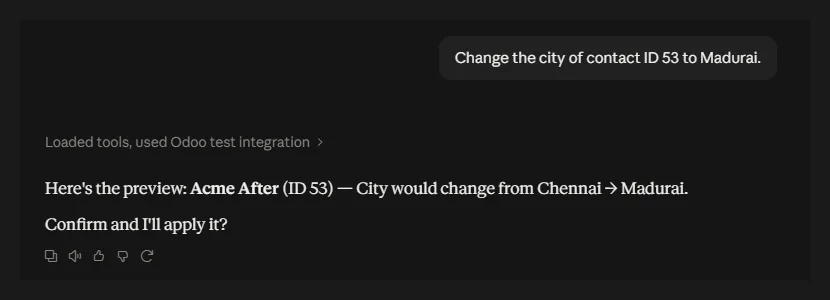
Every change is a draft firstCreate and edit tools return a before → after preview. Nothing is written until the change is confirmed, and a confirmation works only once.
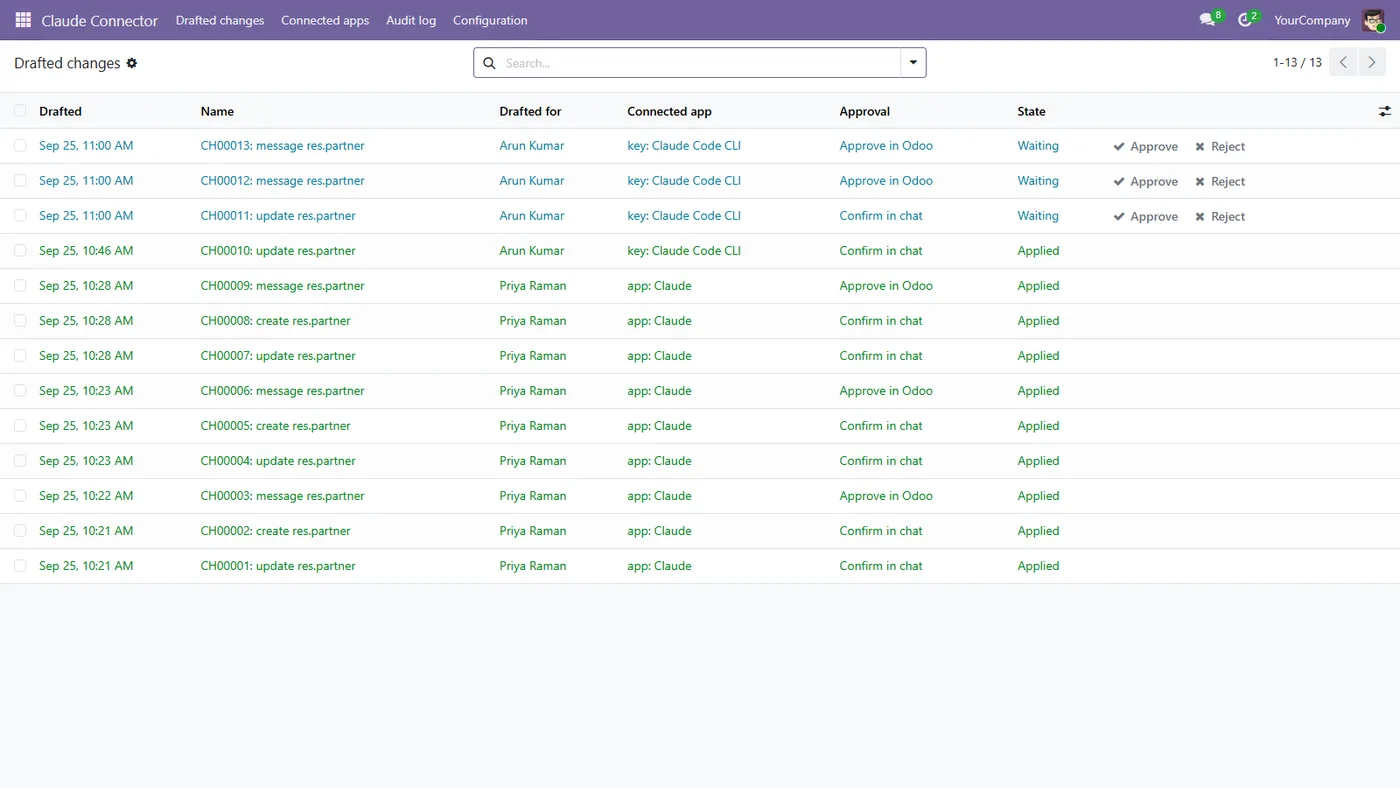
Nothing is sent without youCustomer-facing messages are off by default. When on, each one waits in Drafted changes until a person clicks Approve in Odoo.
Deletes are offDeleting is off by default; when switched on, it also needs approval in Odoo.
Your access rights, not admin'sEach person connects as themselves. A user who cannot edit a record in Odoo cannot edit it through Claude either.
Read-only connectionsOn the sign-in screen each user chooses whether the app may draft changes at all.
No side-door emailsChanges applied through the connector do not send "you have been assigned" emails, and the connector cannot touch system models, users, groups, companies or the mail queue.
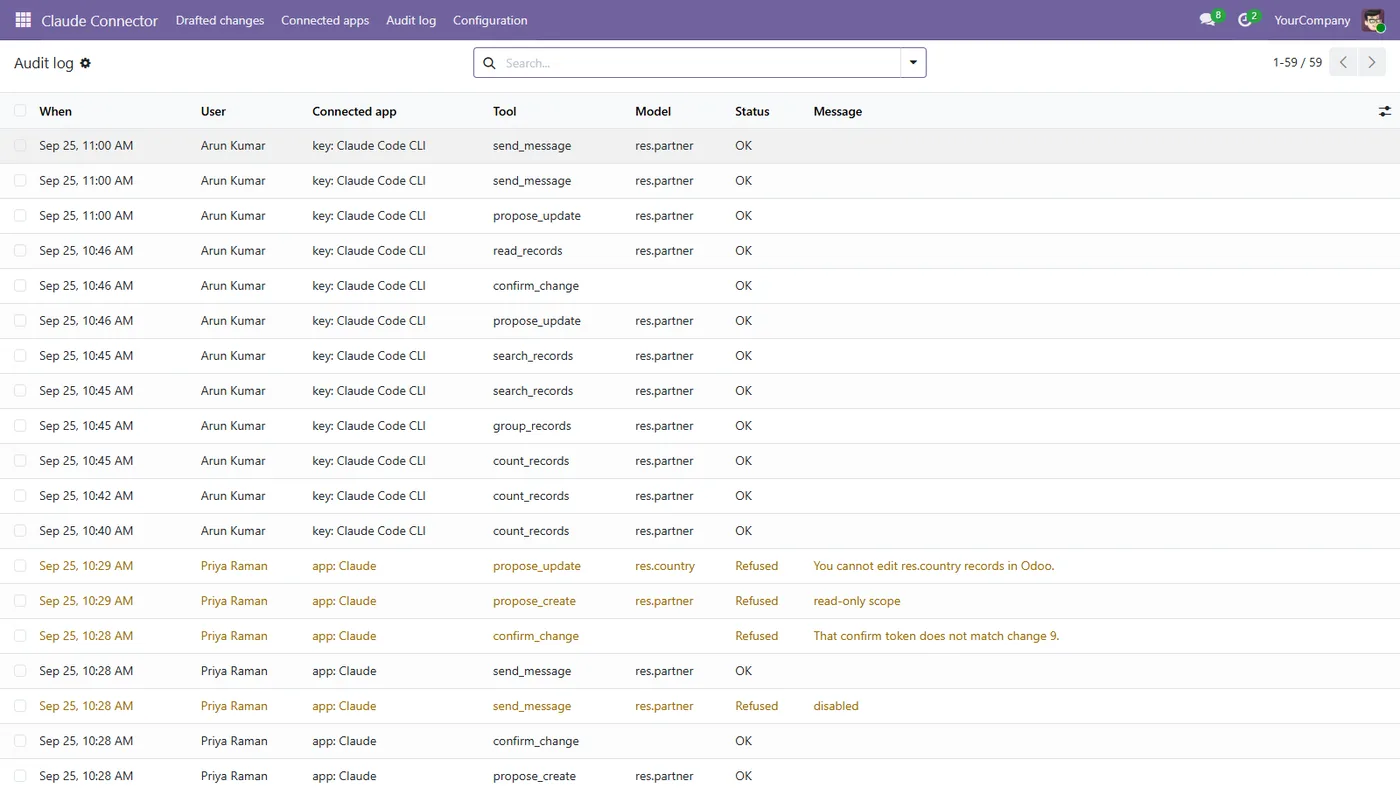
Audit logEvery call is logged: who, which app, which tool, which model and records, and OK / refused / error. Field values are not stored in the log.

Made for how AI reads Odoo

The fields that matterSearches return the ~15 fields a person would look at unless Claude asks for others. Fewer tokens, better answers.
Filters that fix themselvesCommon mistakes such as == or contains are repaired and reported, and a wrong field name gets "Did you mean: name?".
Group and totalBy customer, product or month, for reports and charts.
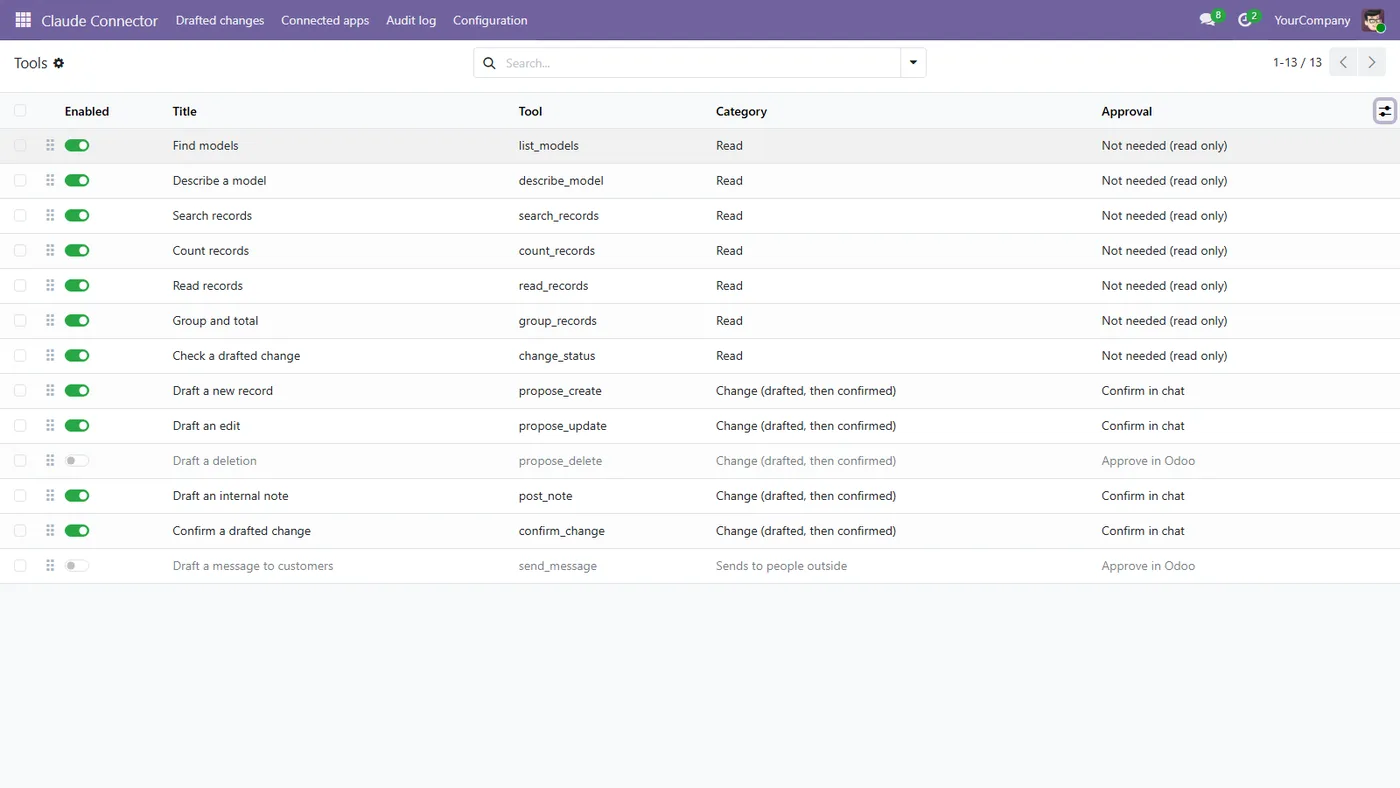
Every tool visibleAll 13 tools are listed on install, each with an on/off switch and an approval setting.
Screenshots

What it looks like

Claude proposes a change and shows the before → after preview.
Drafted changes wait in Odoo until a person clicks Approve.
Every tool listed on install, each with an on/off switch and approval setting.
The audit log: who, which app, which tool, which records, and the outcome.
Specifications

Technical details

Platform
Odoo 19, Community and Enterprise, on-premise and Odoo.sh
Technical name
safe_mcp_connector
Price
US$49 one-time, free updates for Odoo 19
Licence
OPL-1 (Odoo Proprietary License)
Depends on
Discuss (mail) only
Protocol
Model Context Protocol, Streamable HTTP
Sign-in
OAuth 2.1 (dynamic client registration, PKCE, refresh-token rotation) or a per-user API key
Endpoint
https://your-odoo-domain/safe_mcp (/mcp also works when free)
Clients
Claude desktop, web and mobile, Claude Code, Cursor and other MCP clients
Tools
13, each with an on/off switch and an approval setting
Data
Runs inside your Odoo; nothing passes through our servers
Tested
Acceptance checks A1–A16 pass; verified end to end with claude.ai and Claude Code
Support
support@braingrain.in
Setup

Up and running in 4 steps

  1. Install the module, then add the people who may connect to the Claude Connector / User group (Settings › Users).
  2. In Claude: Settings › Connectors › Add custom connector, and paste https://your-odoo-domain/safe_mcp.
  3. Sign in to Odoo in the window that opens and click Allow. The connector then also appears in the Claude mobile app.
  4. For Claude Code, Cursor and scripts, create a key in Claude Connector › Configuration › New API key.

Tip. A Setup check page tells you in plain words if HTTPS, proxy mode or the base URL need fixing.

FAQ

Safe Claude Connector for Odoo: questions

One-time or subscription?

One-time price of US$49, with free updates for Odoo 19.

Where does it run?

Inside your Odoo, on Odoo.sh or your own server. There is no external service and your data does not pass through us. Your Odoo must be reachable over HTTPS.

Which AI apps work with it?

Any client that speaks MCP over Streamable HTTP with OAuth sign-in or a bearer key: Claude (desktop, web, mobile), Claude Code, Cursor and others.

Another MCP module already uses /mcp. Will they clash?

No. This module lives at /safe_mcp, so both can be installed. /mcp also works when it is free.

Can the AI approve its own drafts?

Not for changes set to "Approve in Odoo"; those need a person to click Approve. "Confirm in chat" changes need a single-use token that is only issued with the preview.

Related

Also from Brain Grain

Every Shopify order becomes a GST-correct Odoo invoice: CGST + SGST or IGST by place of supply, HSN on every line, B2B GSTIN and COD.

US$199 Odoo Apps StoreDetails & specs

New
MCP

MCP Server Kit

Developer kit

Turn any REST API or JSON file into tools an AI assistant can call. One config file, no code. Licence key and instant download.

US$29 Brain Grain store (Dodo Payments)Details & specs

Need it customised, or something like it built?

Safe Claude Connector for Odoo started as a problem someone described. Tell us yours, and we reply with what is actually needed before we quote.