Home / Products / POS UPI QR with Auto-Confirm
POS UPI QR with Auto-Confirm (Razorpay) logo
Odoo 19 moduleOdoo Apps Store

POS UPI QR with Auto-Confirm (Razorpay)

A fresh UPI QR for every order, confirmed automatically.

Overview

What POS UPI QR with Auto-Confirm does

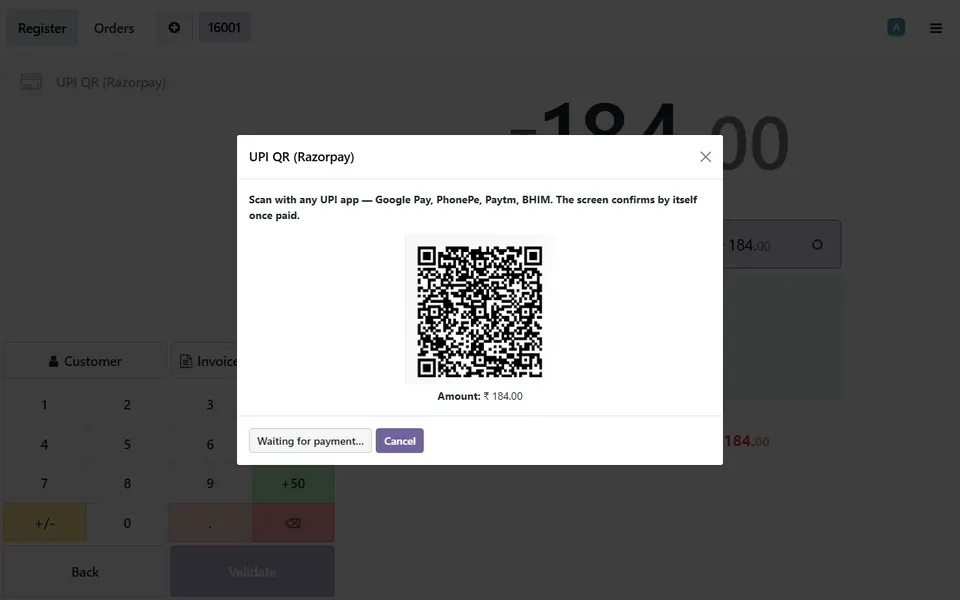
A static UPI sticker at the till means a cashier checking a phone for every payment, and a customer who can type any amount. This module shows a single-use QR locked to the order amount on the Odoo POS screen.

The customer pays from any UPI app (Google Pay, PhonePe, Paytm, BHIM or a bank app), Razorpay confirms the payment by webhook, and the order validates on its own.

Features

Everything it does

At the till

Single-use, amount-locked QRA new QR for every order, which cannot be paid with the wrong amount.
Automatic confirmationBy signed Razorpay webhook, with a polling fallback if a webhook is delayed.
Any UPI appGoogle Pay, PhonePe, Paytm, BHIM or any bank app.
TimeoutAn adjustable timeout for unpaid QR codes.

After the sale

Refunds from the POSRefund a UPI payment without leaving Odoo.
Reconciliation listEvery QR with its payment ID, payer UPI ID and any refund.
Screenshots

What it looks like

The amount-locked QR on the Odoo POS screen.
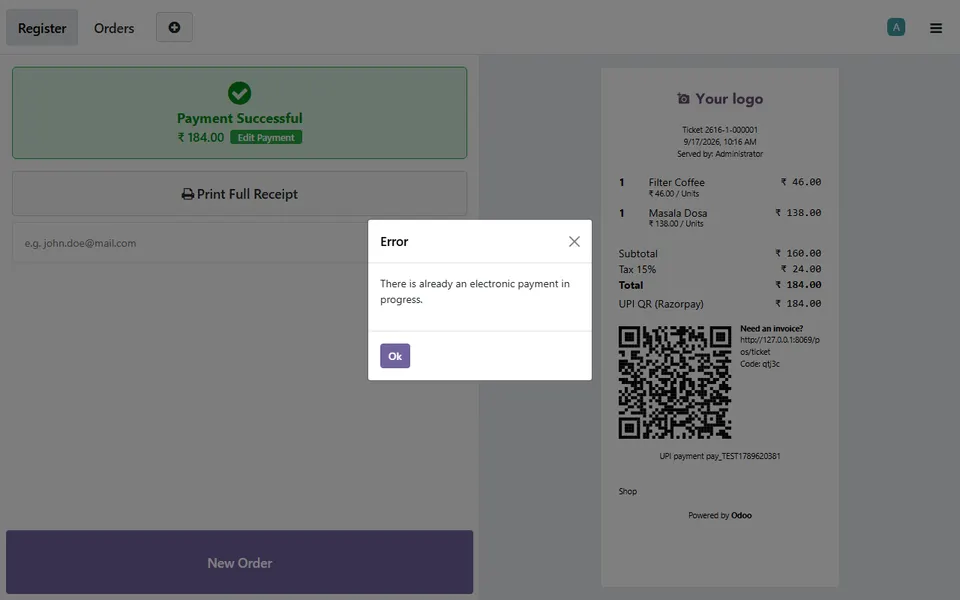
Paid and validated automatically, with the UPI reference on the receipt.
Specifications

Technical details

Platform
Odoo 19, Community and Enterprise
Technical name
pos_upi_qr_razorpay
Price
US$48.74 one-time (as shown on the Odoo Apps Store)
Licence
OPL-1 (Odoo Proprietary License)
Depends on
Point of Sale, Discuss, Inventory, Invoicing
Requires
A Razorpay account with QR Codes enabled; orders in INR
Confirmation
Signed Razorpay webhook, with polling fallback
Support
support@braingrain.in
Setup

Up and running in 4 steps

  1. Install the module.
  2. Create a payment method named "UPI" and enter your Razorpay credentials.
  3. Optionally set up the Razorpay webhook for instant confirmation.
  4. Add the payment method to your POS and open a session.
FAQ

POS UPI QR with Auto-Confirm: questions

Which UPI apps work?

Any UPI app: Google Pay, PhonePe, Paytm, BHIM and bank apps.

What if the webhook is delayed?

The POS also polls Razorpay, so the order still confirms.

Related

Also from Brain Grain

Every Shopify order becomes a GST-correct Odoo invoice: CGST + SGST or IGST by place of supply, HSN on every line, B2B GSTIN and COD.

US$199 Odoo Apps StoreDetails & specs

Connect Claude, Claude Code or Cursor to Odoo over MCP. Claude drafts every change, a person approves it, and nothing is emailed without you.

US$49 Odoo Apps StoreDetails & specs

Need it customised, or something like it built?

POS UPI QR with Auto-Confirm started as a problem someone described. Tell us yours, and we reply with what is actually needed before we quote.